Wednesday, 2 March 2016

Explain type of Registers in Intel 8085.


Ans:
(1)Temporary register(w & z).
(2)General Purpose register (B,C,D,E,H & L).
(3)Program  Counter(PC).
(4)Stack Pointer(Sp)
(5)Accumulator(A)
(6)Instruction Register(IR)

(7)Flag Register

8051 ADDRESSING MODES

What is an addressing mode ?. A simple question always has a simple answer too. Addressing mode is a way to address an operand.  Operand means the data we are operating upon (in most cases source data). It can be a direct address of memory, it can be register names, it can be any numerical data etc. I will explain this with a simple data move instruction of 8051.
MOV A,#6AH
Here the data 6A is the operand, often known as source data. When this instruction is executed, the data 6AH is moved to accumulator A. There are 5 different ways to execute this instruction and hence we say, we have got 5 addressing modes for 8051. They are 1) Immediate addressing mode 2)Direct addressing mode 3) Register direct addressing mode 4) Register indirect addressing mode 5)Indexed addressing mode.

Immediate Addressing Mode

Let’s begin with an example.
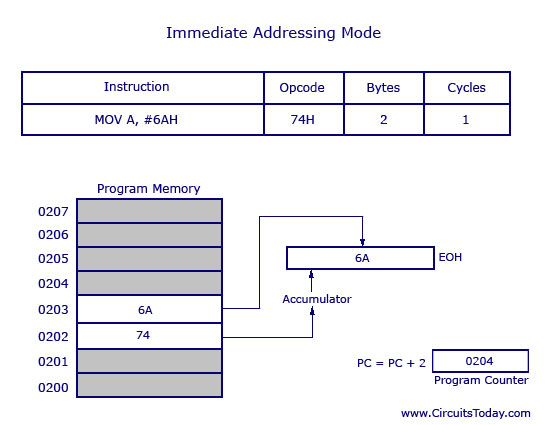
MOV A, #6AH
In general we can write MOV A, #data
This addressing mode is named as “immediate” because it transfers an 8-bit data immediately to the accumulator (destination operand).
The picture above describes the above instruction and its execution.  The opcode for MOV A, # data is 74H. The opcode is saved in program memory at 0202 address. The data 6AH is saved in program memory 0203. (See, any part of the program memory can be used, this is just an example) When the opcode 74H is read, the next step taken would be to transfer whatever data at the next program memory address (here at 0203) to accumulator A (E0H is the address of accumulator). This instruction is of two bytes and is executed in one cycle. So after the execution of this instruction, program counter will add 2 and move to o204 of program memory.
Note: The ‘#’ symbol before 6AH indicates that operand is a data (8 bit). If ‘#’ is not present then the hexadecimal number would be taken as address.

Direct Addressing Mode

This is another way of addressing an operand. Here the address of the data (source data ) is given as operand. Lets take an example.
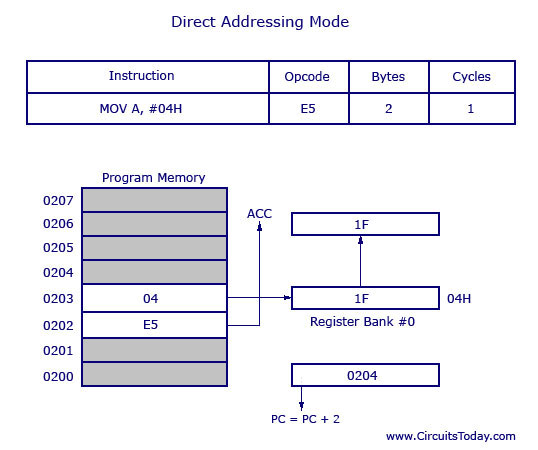
MOV A, 04H
Here 04H is the address of register 4 of register bank#0. When this instruction is executed, what ever data is stored in register 04H is moved to accumulator. In the picture below we can see, register 04H holds the data 1FH. So the data 1FH is moved to accumulator.
Note: We have not used ‘#’ in direct addressing mode, unlike immediate mode. If we had used ‘#’, the data value 04H would have been transferred to accumulator instead 0f 1FH.
As shown in picture above this is a 2 byte instruction which requires 1 cycle to complete. Program counter will increment by 2 and stand in 0204. The opcode for instruction MOV A, address is E5H. When the instruction at 0202 is executed (E5H), accumulator is made active and ready to receive data. Then program control goes to next address that is 0203 and look up the address of the location (04H) where the source data (to be transferred to accumulator) is located. At 04H the control finds the data 1F and transfers it to accumulator and hence the execution is completed.

Register Direct Addressing Mode

In this addressing mode we use the register name directly (as source operand). An example is shown below.
MOV A, R4
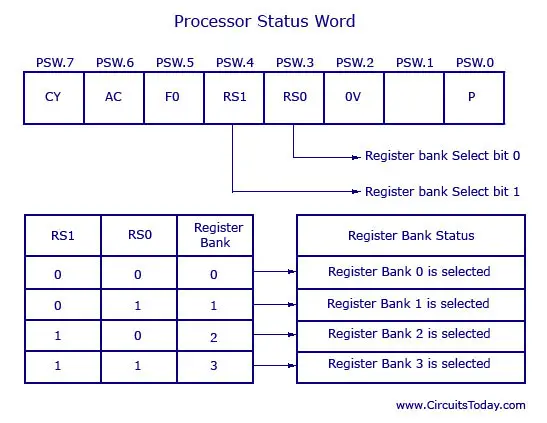
At a time registers can take value from R0,R1…to R7. You may already know there are 32 such registers. So how you access 32 registers with just 8 variables to address registers? Here comes the use of register banks. There are 4 register banks named 0,1,2 and 3. Each bank has 8 registers named from R0 to R7. At a time only one register bank can be selected. Selection of register bank is made possible through a Special Function Register (SFR) named Processor Status Word (PSW). PSW is an 8 bit SFR where each bit can be programmed. Bits are designated from PSW.0 to PSW.7 Register banks are selected using PSW.3 and PSW.4 These two bits are known as register bank select bits as they are used to select register banks. A picture below shows the PSW register and the Register Bank Select bits with status.
So  in register direct addressing mode, data is transferred to accumulator from the register (based on which register bank is selected).
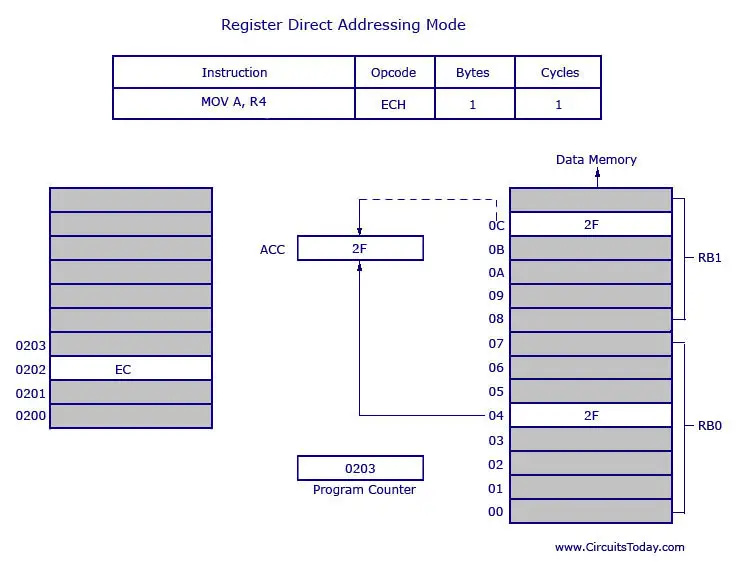
Take a look at the picture below.
So we see that opcode for MOV A, R4 is EC. The opcode is stored in program memory address 0202 and when it is executed the control goes directly to R4 of the respected register bank (that is selected in PSW). If register bank #0 is selected then the data from R4 of register bank #0 will be moved to accumulator. (Here it is 2F stored at 04 H). 04 H is the address of R4 of register bank #0. Movement of data (2F) in this case is shown as bold line. Now please take a look at the dotted line. Here 2F is getting transferred to accumulator from data memory location 0C H. Now understand that 0C H is the address location of Register 4 (R4) of register bank #1. Programmers usually get confused with register bank selection. Also keep in mind that data at R4 of  register bank #0 and register bank #1 (or even other banks) will not be same. So wrong selection of register banks will result in undesired output.
Also note that the instruction above is 1 byte and requires 1 cycle for complete execution. This means using register direct addressing mode can save program memory.

Register Indirect Addressing Mode

So in this addressing mode, address of the data (source data to transfer) is given in the register operand.
MOV A, @R0
Here the value inside R0 is considered as an address, which holds the data to be transferred to accumulator.
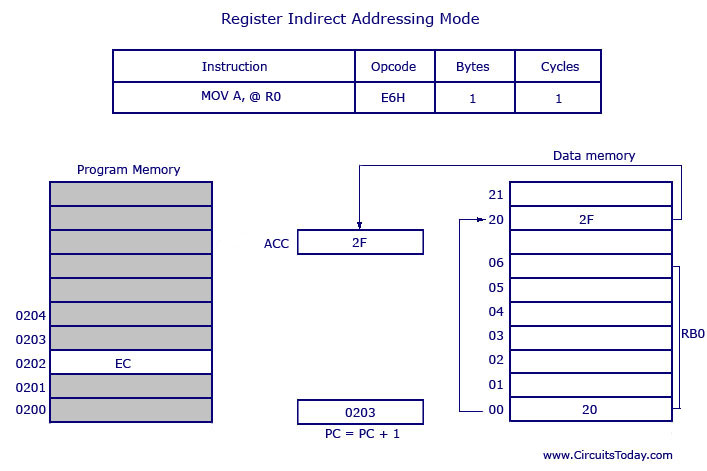
Example: If R0 holds the value 20H, and we have a data 2F H stored at the address 20H, then the value 2FH will get transferred to accumulator after executing this instruction. Got it? See  the picture below.
So the opcode for MOV A, @R0 is E6H. Assuming that register bank #0 is selected. So the R0 of register bank #0 holds the data 20H. Program control moves to 20H where it locates the data 2FH and it transfers 2FH to accumulator.
This is a single byte instruction and the program counter increments 1 and moves to 0203 of program memory.
Note: Only R0 and R1 are allowed to form a register indirect addressing instruction. In other words programmer can must make any instruction either using @R0 or @R1. All register banks are allowed.

Indexed Addressing Mode

Well lets see two examples first.
MOVC A, @A+DPTR and MOVC A, @A+PC
where DPTR is data pointer and PC is program counter (both are 16 bit registers). Lets take the first example.
MOVC A, @A+DPTR
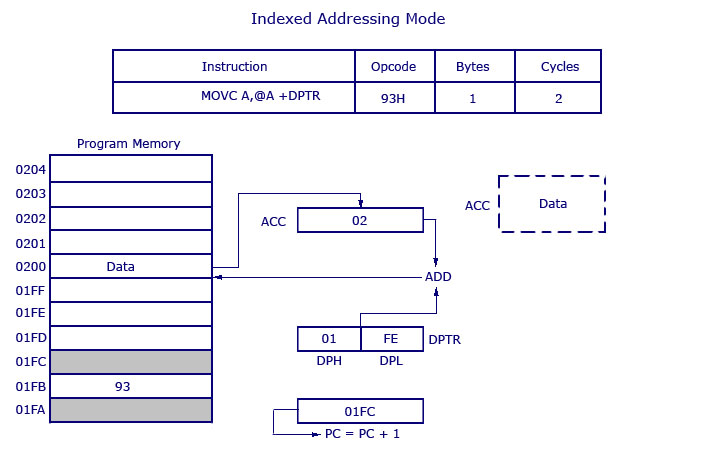
What’s the first impression you have now? The source operand is @A+DPTR and we know we will get the source data (to transfer) from this location. It is nothing but adding contents of DPTR with present content of accumulator. This addition will result a new data which is taken as the address of source data (to transfer). The data at this address is then transferred to accumulator.  Take a look at the picture below.
 
The opcode for the instruction is 93H. DPTR holds the value 01FE, where 01 is located in DPH (higher 8 bits) and FE is located in DPL (lower 8 bits). Accumulator now has the value 02H. A 16 bit addition is performed and now 01FE H+02 H results in 0200 H. What ever data is in 0200 H will get transferred to accumulator. The previous value inside accumulator (02H) will get replaced with new data from 0200H. New data in the accumulator is shown in dotted line box.
This is a 1 byte instruction with 2 cycles needed for execution. What you infer from that? The execution time required for this instruction is high compared to previous instructions (which all were 1 cycle).
Tuesday, 1 March 2016

EXPLAIN PIN DIAGRAM OF 8051


Port 0(p0.0 to p0.7):
It is 8-bit bi-directional I/O port. It is bit/ byte addressable. During external memory access, it functions as multiplexed data and low-order address bus AD0-AD7.

Port 1 (p1.0 to p1.7): 
It is 8-bit bi-directional I/O port. It is bit/ byte addressable. When logic '1' is written into port latch then it works as input mode. It functions as simply I/O port and it does not have any alternative function. 

Port 2 (p2.0 to p2.7): 
It is 8-bit bi-directional I/O port. It is bit/ byte addressable. During external memory access it functions as higher order address bus (A8-A15). 

Port 3(p3.0 to port 3.7):
It is 8-bit I/O port. In an alternating function each pins can be used as a special function I/O pin. 

P3.0-RxD:
It is an Input signal. Through this I/P signal microcontroller receives serial data of serial communication circuit.

P3.1-TxD:
It is O/P signal of serial port. Through this signal data is transmitted. 

P3.2- (INT0):
It is external hardware interrupt I/P signal. Through this user, programmer or peripheral interrupts to microcontroller. 

P3.3-(INT1):
It is external hardware interrupt I/P signal. Through this user, programmer or peripheral interrupts to microcontroller.

P3.4- T0:
It is I/P signal to internal timer-0 circuit. External clock pulses can connects to timer-0 through this I/P signal.

P3.5-T1:
It is I/P signal to internal timer-1 circuit. External clock pulses can connects to timer-1 through this I/P signal.

P3.6-[WR(bar)]:
It is active low write O/P control signal. During External RAM (Data memory) access it is generated by microcontroller. when [WR(bar)]=0, then performs write operation. 

P3.7-[RD(bar)]:
It is active low read O/P control signal. During External RAM (Data memory) access it is generated by microcontroller. when [RD(bar)]=0, then performs read operation from external RAM. 

XTAL1 and XTAL2:
These are two I/P line for on-chip oscillator and clock generator circuit. A resonant network as quartz crystal is connected between these two pin. 8051 microcontroller also drives from external clock, then XTAL2 is used to drive 8051 from external clock and XTAL1 should be grounded. 

[EA(bar)]/VPP:
It is and active low I/P to 8051 microcontroller. when (EA)= 0, then 8051 microcontroller access from external program memory (ROM) only. When (EA) = 1, then it access internal and external program memories (ROMS). 

[PSEN(bar)]:
It is active low O/P signal. It is used to enable external program memory (ROM). When [PSEN(bar)]= 0, then external program memory becomes enabled and microcontroller read content of external memory location. Therefore it is connected to (OE) of external ROM. It is activated twice every external ROM memory cycle. 

ALE:
Address latch enable: It is active high O/P signal. When it goes high, external address latch becomes enabling and lower address of external memory (RAM or ROM) latched into it. Thus it separates A0-A7 address from AD0-AD7. It provides properly timed signal to latch lower byte address. The ALE is activated twice in every machine cycle. If external RAM & ROM is not accessed, then ALE is activated at constant rate of 1/6 oscillator frequency, which can be used as a clock pulses for driving external devices. 

RESET: 
It is active high I/P signal. It should be maintained high for at least two machine cycle while oscillator is running then 8051 microcontroller resets

Friday, 26 February 2016

RAID

Standard RAID levels

RAID 0: This configuration has striping but no redundancy of data. It offers the best performance but no fault-tolerance.


(1)RAID (redundant array of independent disks; originally redundant array of inexpensive disks) provides a way of storing the same data in different places (thus, redundantly) on multiple hard disks (though not all RAID levels provide redundancy). By placing data on multiple disks, input/output (I/O) operations can overlap in a balanced way, improving performance.


(2)RAID arrays appear to the operating system (OS) as a single logical hard disk. 


Standard RAID levels

RAID 0: This configuration has striping but no redundancy of data. It offers the best performance but no fault-tolerance.


RAID 0 diagram

RAID 1: Also known as disk mirroring, this configuration consists of at least two drives that duplicate the storage of data. There is no striping. Read performance is improved since either disk can be read at the same time. Write performance is the same as for single disk storage.
RAID 1 diagram
RAID 2: This configuration uses striping across disks with some disks storing error checking and correcting (ECC) information. It has no advantage over RAID 3 and is no longer used.
RAID 2 diagram
RAID 3: This technique uses striping and dedicates one drive to storing parityinformation. The embedded ECC information is used to detect errors. Data recovery is accomplished by calculating the exclusive OR (XOR) of the information recorded on the other drives. Since an I/O operation addresses all drives at the same time, RAID 3 cannot overlap I/O. For this reason, RAID 3 is best for single-user systems with long record applications.
RAID 3 diagram
RAID 4: This level uses large stripes, which means you can read records from any single drive. This allows you to use overlapped I/O for read operations. Since all write operations have to update the parity drive, no I/O overlapping is possible. RAID 4 offers no advantage over RAID 5.
RAID 4 diagram
RAID 5This level is based on block-level striping with parity. The parity information is striped across each drive, allowing the array to function even if one drive were to fail. The array’s architecture allows read and write operations to span multiple drives. This results in performance that is usually better than that of a single drive, but not as high as that of a RAID 0 array. RAID 5 requires at least three disks, but it is often recommended to use at least five disks for performance reasons.
RAID 5 arrays are generally considered to be a poor choice for use on write-intensive systems because of the performance impact associated with writing parity information. When a disk does fail, it can take a long time to rebuild a RAID 5 array. Performance is usually degraded during the rebuild time and the array is vulnerable to an additional disk failure until the rebuild is complete.
RAID 5 diagram
RAID 6: This technique is similar to RAID 5 but includes a second parity scheme that is distributed across the drives in the array. The use of additional parity allows the array to continue to function even if two disks fail simultaneously. However, this extra protection comes at a cost. RAID 6 arrays have a higher cost per gigabyte (GB) and often have slower write performance than RAID 5 arrays.
RAID 6 diagram

Nested RAID levels

Some RAID levels are referred to as nested RAID because they are based on a combination of RAID levels. Here are some examples of nested RAID levels.

RAID 10 (RAID 1+0): Combining RAID 1 and RAID 0, this level is often referred to as RAID 10, which offers higher performance than RAID 1 but at a much higher cost. In RAID 1+0, the data is mirrored and the mirrors are striped.
RAID 10 diagram

8085 Programming


8085 Assembly Language Programs & Explanations1. Statement
: Store the data byte 32H into memory location 4000H.

Program 1:

MVI A, 32H : Store 32H in the accumulator

STA 4000H : Copy accumulator contents at address 4000H HLT : Terminate program execution


Program 2:

PROGRAM TO LOAD  A WITH 30H ,B WITH 44H ,H WITH 93H.

ANS:

ALOGRITHM:

STEP 1: LOAD  A WITH 30H
 STEP 2: LOAD B WITH 44H
STEP 3:LOAD H WITH 93H
STEP 4: STOP

MVI  A, 30H  ;  (LOAD  A WITH 30H)
MVI  B,44H ;   (LOAD B WITH 44H)
MVI H,93H ;(lOAD  H WITH 93H)
HLT   ;

Program 3:

LOAD B  AND C WITH DATA BYTES 65H AND 87H  .  ADD B WITH C, AND STORE RESULT IN B.

ANS:

ALGORITHM:

STEP 1: LOAD B REG. WITH 65H
STEP 2: LOAD C REG. WITH 87H
STEP 3: LOAD ACCUMULATOR  WITH B REG.
STEP 4:ADD  A REG WITH B REG.
STEP 5: STORE RESULT IN B REGISTER.
STEP 6: STOP.
PROGRAM :
   MVI  B,   65H   ; LOAD  B REG. WITH 65H
MVI    C,   87H ; LOAD C REG. WITH 87H
MOV  A,   B    ;  LOAD  A REG. WITH B REG.
ADD  C   ;    A REG <---A  REG.+ B REG.
MOV  B,  A   ; STORE RESULT IN B REG.
HLT   ;  STOP

Program 4:
ADD  THE CONTENTS OF TWO MEMORY LOCATIONS D000H AND D0001H. STORE RESULT IN MEMORY LOCATION D002H.

ALGORITHM :

STEP 1: LOAD FIRST   NUMBER FROM MEMORY LOCATION D000H.

STEP 2:LOAD  SECOND NUMBER FROM  MEMORY LOCATION D001H.

STEP 3:ADD FIRST  NUMBER  WITH SECOND NUMBERS.

STEP 4: STORE RESULT  TO MEMORY  LOCATION  D002H.

STEP 5: STOP.

PROGRAM :

LDA D000H  ; LOAD FIRST NUMBER FROM D000H IN A REG.
MOV  B, A   ; COPY  IT TO B REG.
LDA  D001H  ; LOAD SECOND NUMBER FROM D001H IN
ADD  B      ;  LOAD   A REG.<---A REG. + B REG.
STA  D002H; STORE RESULT  AT MEMORY LOCATION D002H
HLT     ;


write a program addition of two 16-bit  numbers:

Program - 5.a: Add two 16-bit numbers - Source Program 1

Sample problem:

(4000H) = 15H
(4001H) = 1CH
(4002H) = B7H
(4003H) = 5AH
Result = 1C15 + 5AB7H = 76CCH
(4004H) = CCH
(4005H) = 76H

Source Program 1:
LHLD 4000H                : Get first I6-bit number in HL
XCHG                        : Save first I6-bit number in DE
LHLD 4002H                : Get second I6-bit number in HL
MOV A, E                : Get lower byte of the first number
ADD L                        : Add lower byte of the second number
MOV L, A                : Store result in L register
MOV A, D                : Get higher byte of the first number
ADC H                        : Add higher byte of the second number with CARRY
MOV H, A                : Store result in H register
SHLD 4004H                : Store I6-bit result in memory locations 4004H and 4005H.
HLT                        : Terminate program execution


Thursday, 25 February 2016

Instruction Format

Instruction Format :

what is instruction ?

ans:instruction is a command  to the microprocessor to perform a given task on a specified data.
Each  instruction has two parts:
(a)one is task to be performed,called the operation code..(op-code)
(b)the second is the data to be operated on ,called the operand.

THE  8085 ,instruction set is classified  into the following groups according to length..:

(1) 1-byte instructions:
A one byte instruction includes the op-code and operand in the same  byte.
example  :

MOV   B,  A


(2)2-byte instructions:
in a two byte instruction ,the first byte specifies the operation code and the second byte specifies the operand..

example:

MVI  A , 40H

(3)3-byte instructions:
in a three byte instruction ,the first byte specifies ,the op-code and the following two bytes specify the 16-bit address or 16bit-data.

example:

LXI H , 9000H


Interrupts in 8085 Microprocessor

First of all i want to discuss that what is Interrupt???????

Interrupt is a mechanism by which an I/O or an instruction can suspend the normal execution of processor and get itself serviced. Generally, a particular task is assigned to that interrupt signal. In the microprocessor based system the interrupts are used for data transfer between the peripheral  devices and the microprocessor. The processor will check the interrupts always at the 2nd T-state of last machine cycle.

Interrupt Service Routine(ISR):-A small program or a routine that when executed services
 the corresponding interrupting source is called as an ISR.

Maskable/Non-Maskable Interrupt:-An interrupt that can be disabled by writing some instruction is known as Maskable Interrupt otherwise it is called Non-Maskable Interrupt.

There are two types of interrupts used in 8085 Microprocessor:

1.Hardware Interrupts
2.Software Interrupts

There are 6 pins available in 8085 for interrupt:

TRAP
RST 7.5
RST6.5
RST5.5
INTR
INTA

Execution of Interrupts:-
When there is an interrupt requests to the Microprocessor then after accepting the interrupts Microprocessor send the INTA (active low) signal to the peripheral. The vectored address of particular interrupt is stored in program counter. The processor executes an interrupt service routine (ISR) addressed in program counter.

Disqus Shortname

Ads Top

About Me

My photo
Technical Trainer for Full Stack Web Development & Digital Marketing Course

Comments system

Popular Posts

Navigation-Menus (Do Not Edit Here!)

Animation - Scroll IMG (yes/no)

Fixed Menu (yes/no)

Related Posts No. (ex: 9)

PageNavi Results No. (ex: 7)

Facebook

Advertising

Popular